
Procore + QuickBooks
Procore QuickBooks Integration Built Around Your Job Costing
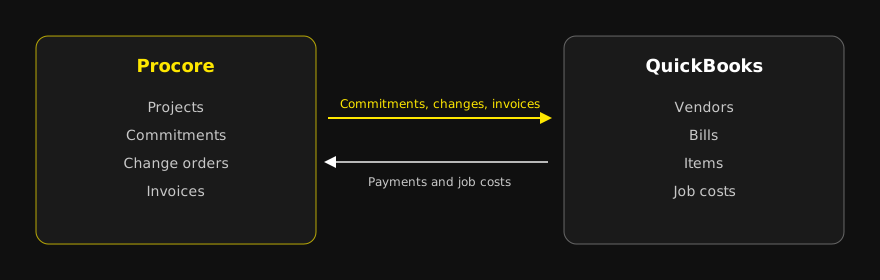
Your PMs live in Procore. But too many companies are doing repeat data entry to bring data from Procore into QuickBooks. A Procore QuickBooks integration is software that moves vendors, cost codes, commitments, change orders, invoices, and job costs between the two systems so job costs stay current without double entry. R Creative builds custom integrations around your workflow, includes only what your team needs, and keeps them running after launch.
The real cost of re-keying Procore into QuickBooks
When Procore and QuickBooks do not talk, someone in accounting retypes subcontractor invoices, commitments, and change orders. That person is usually days behind the field. By the time a cost overrun shows up in QuickBooks, the PM has already bought out the next phase of work.
The problem is not effort. It is timing. Owners and COOs end up looking at job cost reports that are a week or a month stale, and margin problems get spotted too late to fix.
What Procore's own QuickBooks connector covers, and what it leaves out
Procore offers a QuickBooks Online connector and a separate QuickBooks Desktop connector. For many contractors, the native connector is the right starting point, and we will tell you if it is enough. Here is what Procore's public documentation says about the QuickBooks Online connector today:
- It exports project WBS codes (as QuickBooks items), companies (as vendors), subcontractor invoices (as bills), and owner invoices (as customer invoices).
- It imports QuickBooks projects and job costs into Procore. Job costs sync automatically once a day, or on demand.
- It does not sync budgets, prime contracts, prime contract change orders, commitments (subcontracts and purchase orders), commitment change orders, or timecards. It also does not support single-tier cost codes or sub jobs.
- It requires QuickBooks Online Plus or Advanced. Simple Start and Essentials are not supported. It is limited to one QuickBooks company per Procore site.
- It is designed for new projects. Projects created before the connector was set up cannot be synced without paid help.
- Subcontractor invoices with negative values do not sync.
If your controller needs commitments and change orders in QuickBooks to see committed cost, or you run more than one QuickBooks company, those gaps are where a custom build earns its keep.
What a custom Procore QuickBooks integration can sync
A custom integration is built on Procore's API and the QuickBooks API, under your own accounts. You decide which records move, in which direction, and on what schedule.
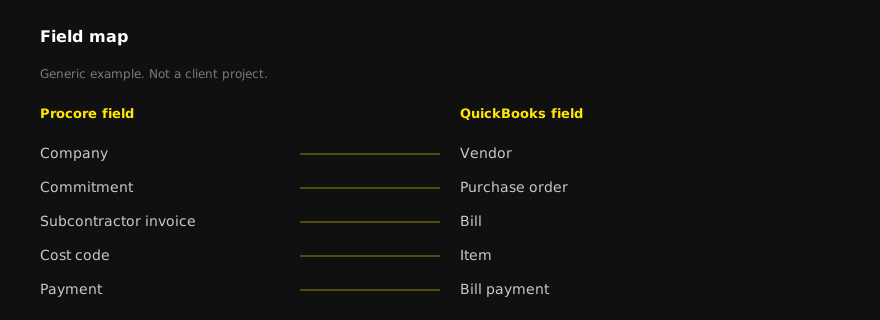
| Data | Typical direction | Notes |
|---|---|---|
| Vendors / companies | Two-way, QuickBooks as master | Match on tax ID or vendor number, not name |
| Cost codes and cost types | One-way, master list to both | Keep one standard list; avoid project-only codes |
| Projects / jobs | One-way, Procore to QuickBooks | Job number format agreed up front |
| Commitments (subcontracts, POs) | One-way, Procore to QuickBooks | Gives accounting committed cost by job |
| Change orders | One-way, Procore to QuickBooks | Synced only after approval in Procore |
| Subcontractor invoices | One-way, Procore to QuickBooks bills | Retainage and negative lines handled by rule |
| Payments | QuickBooks to Procore | PMs see what has been paid |
| Job costs (actuals) | QuickBooks to Procore | Hourly or nightly, your choice |
One-way vs two-way sync
Two-way sync sounds better, but it creates more ways to break. Most contractors do best with a clear "system of record" for each data type: Procore owns commitments and change orders, QuickBooks owns vendors and payments, and each record only flows one way. We use two-way sync only where both teams truly edit the same record, and we write rules for which side wins a conflict.
Where Procore and QuickBooks integrations usually break
- Vendor duplicates. "ABC Electric" and "ABC Electric, LLC" become two vendors. We match on a unique ID instead of a name.
- Cost code drift. A PM adds a project-only cost code that QuickBooks has never seen, and the sync rejects the record.
- Retainage. Retainage held on a sub invoice needs its own handling so payables and job cost both stay right.
- Closed periods. An invoice approved in Procore after accounting closes the month fails to post. The integration needs a rule and an alert, not a silent failure.
- QuickBooks edition limits. Desktop and Online behave differently, and some Online editions do not support projects.
- Silent failures. The worst break is the one nobody sees. Every build we deliver logs each sync and sends an alert when a record fails.
How it works
- Map the workflow. We sit with your PMs and your accounting team, list every record that crosses between Procore and QuickBooks, and agree on the system of record for each one. You get a written data map before we write code.
- Build and connect. We build the integration on Procore's and Intuit's APIs, test it against a copy of real project data, and run it side by side with your current process before cutting over.
- Keep it running. We monitor syncs, fix breaks, and update the integration when Procore, QuickBooks, or your workflow changes.
Not sure what your team needs synced? Get a free integration review. We will look at how Procore and QuickBooks are used today and tell you whether the native connector covers it or a custom build makes sense.
Why R Creative
R Creative builds custom software and system integrations for operations-heavy businesses. We engineered Crossroads Fleet Management, a custom fleet platform for Cahaba Truck and Equipment that Norfolk Southern now uses across its operating divisions. It includes multi-shop invoice processing and billing reconciliation, and we still host and maintain it today. Norfolk Southern case study
We are not a Procore partner and we do not sell a packaged connector. Each integration is built for one company's workflow and owned by that company.
Free download: the Procore-to-accounting data map
A one-page checklist of the fields most contractors sync between Procore and their accounting system, plus the common breaks to plan for. Use it with your controller before you buy or build anything.
Download the Procore-to-accounting data map
Related reading: Procore integrations, AI for construction teams, AEC, and web design and development.
FAQ
Frequently asked questions
Yes. Procore offers a native QuickBooks Online connector and a separate QuickBooks Desktop connector. Per Procore's documentation, the Online connector imports projects from QuickBooks Online into Procore, but projects created in Procore cannot currently be exported to QuickBooks Online. It also syncs vendors, cost codes, subcontractor invoices, owner invoices, and job costs, but not commitments, change orders, budgets, or timecards.
A custom integration can sync records the native connector skips, such as commitments and change orders, handle multiple QuickBooks companies, apply your own retainage and approval rules, and alert your team when a record fails to sync.
Usually yes. QuickBooks Desktop connects through Intuit's Web Connector, so it needs a machine that stays on and a Windows user who stays logged in, because the connector is an app, not a service. We review your setup in the free integration review and tell you what is practical.
Most contractors do best with one system of record per data type. Commitments and change orders flow from Procore to QuickBooks, and payments and actual costs flow back. Two-way sync is used only where both teams edit the same record.
It depends on how many records and rules are involved. We give you a timeline after mapping your workflow, and we run the integration side by side with your current process before switching over.
You do. The integration runs under your Procore and QuickBooks accounts, and the code and documentation are yours.
Get a free integration review
Bring your PM and your controller. In one call we will map what is re-keyed today and what it would take to stop.