
Procore Integrations
Custom Procore Integrations for Accounting, ERP, and the Rest of Your Stack
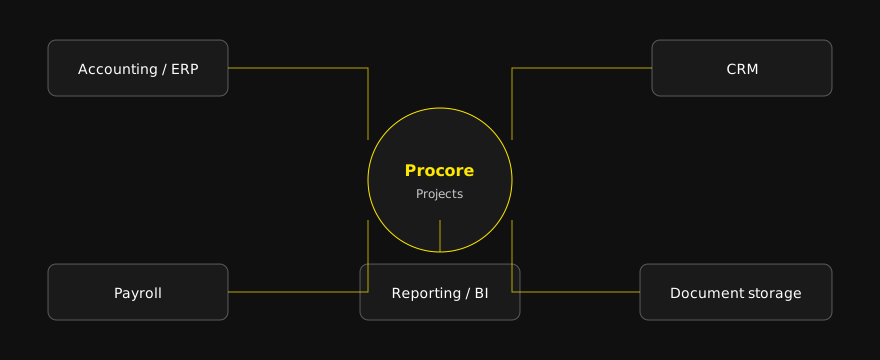
Your PMs live in Procore and your accounting team re-keys it all. Procore integrations connect Procore to other business systems, such as accounting, ERP, CRM, and reporting tools, so job costs stay current without double entry. R Creative builds custom integrations around your workflow, not a packaged product, and we keep them running after launch.
Who this is for
General contractors and specialty trade contractors, roughly 40 to 200 people, where:
- Project managers run commitments, change orders, and invoices in Procore.
- Accounting runs the books in QuickBooks, NetSuite, Sage, Acumatica, or another ERP.
- Someone spends hours each week retyping between the two.
- The owner, COO, or VP of Operations finds out about cost overruns after the money is spent.
If that sounds like your company, the issue is not your people. It is the gap between your systems.
Native connector, marketplace app, or custom build?
You have three paths, and we will tell you which one fits.
Procore's native ERP connectors. Procore's documentation lists connectors for QuickBooks Online, QuickBooks Desktop, NetSuite, Sage 100 Contractor, Sage 300 CRE, Sage Intacct, Acumatica, CMiC, MRI Platform X, Yardi Voyager, Workday, Xero, Viewpoint Spectrum, and Viewpoint Vista. Start here if your workflow is simple. Some connectors leave out records. For example, Procore's documentation says its QuickBooks Online and NetSuite connectors do not sync commitments, change orders, or budgets.
Marketplace apps from other vendors. Procore's App Marketplace includes partner-built connectors. These work well when your process matches how the app was designed.
A custom integration. Built on Procore's API for one company's workflow. It makes sense when you need records the connectors skip, run multiple entities, have approval or retainage rules a packaged tool cannot follow, or need Procore data in tools beyond accounting.
| Comparison | Native connector | Marketplace app | Custom build (R Creative) |
|---|---|---|---|
| Fits standard workflows | Yes | Yes | Yes |
| Your own rules and exceptions | Limited | Varies | Built to your rules |
| Records outside the connector's scope | No | Varies | Yes |
| Multiple companies or subsidiaries | Often limited | Varies | Yes |
| Ongoing cost | Subscription | Subscription | Build plus support |
| Who you call when it breaks | Vendor support | App vendor | Us |
What we connect Procore to
Accounting and ERP
The most common request. Vendors, cost codes, projects, commitments, change orders, subcontractor invoices, payments, and actual job costs.
- Procore QuickBooks integration: QuickBooks Online and Desktop.
- Procore NetSuite integration: multi-subsidiary NetSuite setups.
- Sage, Acumatica, Viewpoint, and others: same approach, mapped to your ERP's data model.
CRM
Won opportunities in HubSpot or Salesforce become Procore projects with the right fields filled in, so estimating and preconstruction data does not get retyped.
Reporting
Procore and accounting data pulled into one job cost dashboard for the owner and COO, refreshed on a schedule.
AI workflows
Agents that read Procore data and flag aging RFIs, overdue submittals, or commitments near budget. See construction AI software.
What syncs in a typical Procore accounting integration
| Data | Typical direction | Why it matters |
|---|---|---|
| Vendors / companies | Accounting to Procore | One clean vendor list, no duplicates |
| Cost codes and cost types | Master list to both | Job cost reports line up across systems |
| Projects / jobs | Procore or CRM to accounting | Jobs created once, with one numbering scheme |
| Commitments | Procore to accounting | Committed cost visible to the controller |
| Change orders | Procore to accounting | Approved changes hit forecasts right away |
| Subcontractor invoices | Procore to accounting | No retyping of pay apps |
| Payments and actual costs | Accounting to Procore | PMs see real numbers in Procore |
One-way vs two-way, in plain terms
One-way means each record has one owner system and flows in one direction. It is simpler and breaks less. Two-way means both systems can edit the same record and the integration keeps them matched, which needs conflict rules. We default to one-way with a clear system of record for each data type and add two-way only where both teams truly need to edit.
Where Procore integrations break
- Duplicate vendors matched on name instead of an ID
- Project-only cost codes that the accounting system has never seen
- Retainage and negative invoice lines
- Approvals that land after accounting closes a period
- Projects that started before the integration existed
- API rate limits during month-end volume
- Failures nobody sees until the numbers look wrong
Every integration we build logs each sync and alerts your team when something fails.
How it works
- Map the workflow. We interview your PMs and accounting team and produce a written data map: every record, its direction, its system of record, and the rules.
- Build and connect. We build on Procore's API and your other systems' APIs, test with real project data, and run in parallel before cutting over.
- Keep it running. We monitor syncs, fix breaks, and update the integration as Procore, your ERP, or your process changes.
Get a free integration review. We will look at your current setup and tell you whether a native connector, an app, or a custom build fits, even if the answer is not us.
Why R Creative
R Creative builds websites, custom software, and system integrations wired into a company's CRM, ERP, and marketing stack. We engineered Crossroads Fleet Management for Cahaba Truck and Equipment, a custom platform Norfolk Southern now uses across its operating divisions, and we continue to host and maintain it. Norfolk Southern case study
To be clear: R Creative is not a Procore partner and does not sell a Procore app. Every integration is custom work, owned by the client.
Free download: the Procore-to-accounting data map
A one-page checklist of the fields to sync and the common breaks to plan for.
Download the Procore-to-accounting data map
Related reading: AEC firms, CRM automation, web design and development, and custom AI agents.
FAQ
Frequently asked questions
Procore integrations connect Procore to other business systems, most often accounting and ERP software, so data like vendors, cost codes, commitments, invoices, and job costs move between systems without retyping.
Procore's documentation lists native connectors for QuickBooks Online and Desktop, NetSuite, Sage 100 Contractor, Sage 300 CRE, Sage Intacct, Acumatica, CMiC, MRI Platform X, Yardi Voyager, Workday, Xero, Viewpoint Spectrum, and Viewpoint Vista. Partner-built apps cover others.
When the native connector leaves out records you need, such as commitments and change orders, when you run multiple companies or subsidiaries, or when your approval and retainage rules do not fit a packaged tool.
Not always. Many companies keep the native connector and add a custom integration for the gaps. We recommend the simplest setup that covers your workflow.
We log every sync, alert your team on failures with a plain-English reason, and provide ongoing support to fix breaks and handle changes in Procore or your ERP.
The client. It runs under your Procore and accounting accounts, and the code and documentation are yours.
Get a free integration review
Bring your PM and your controller and we will map what is re-keyed today.